

![图片[1]-OpenSkills: Revolutionizing AI Coding Agents with Universal Skills Loader-🎉数字奇遇🎉](https://www.freeyong.com/wp-content/uploads/2025/12/4f619ef93020251215102037.webp)
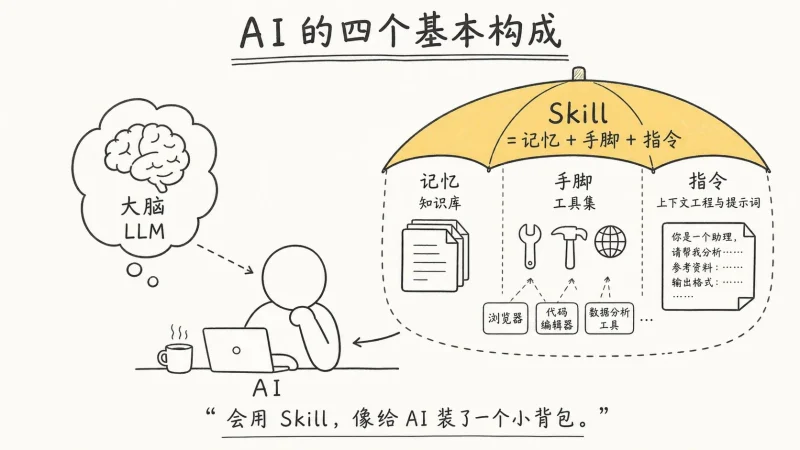
In the rapidly evolving landscape of artificial intelligence, developers and organizations are constantly seeking innovative ways to enhance the capabilities of AI coding agents. One such groundbreaking solution is OpenSkills, a universal skills loader for AI coding agents, developed by numman-ali. This powerful tool aims to bring the flexibility and efficiency of Anthropic’s skills system to a wide range of AI coding agents, including Claude Code, Cursor, Windsurf, and Aider. By leveraging OpenSkills, users can unlock a new level of productivity and creativity in their AI-driven workflows.
Understanding OpenSkills
OpenSkills is designed to replicate the functionality of Anthropic’s skills system with 100% compatibility. It achieves this by using the same prompt format, marketplace, folders, and SKILL.md format as Claude Code. The primary difference lies in the invocation method: while Claude Code uses the “Skill” tool, OpenSkills employs a CLI (Command Line Interface) command, “openskills read [name]”. This approach ensures that users can seamlessly integrate skills into their AI agents without compromising on functionality or ease of use.
The core concept behind OpenSkills is to provide a universal platform for installing, managing, and utilizing skills across various AI coding agents. This is particularly beneficial for developers who work with multiple agents, as it allows them to maintain a consistent and efficient workflow. By centralizing skill management, OpenSkills eliminates the need for redundant installations and simplifies the process of updating and maintaining skills.
Key Features of OpenSkills
Installation and Management
OpenSkills offers a straightforward installation process, making it accessible to users of all skill levels. To get started, users simply need to run the command npm i -g openskills to install the tool globally. Once installed, they can begin installing skills from various sources, including GitHub repositories, local paths, and private Git repos. The openskills install command provides an interactive selection process, allowing users to choose which skills to install from a given repository.
In addition to installation, OpenSkills also provides robust management capabilities. Users can list installed skills, remove specific skills, or manage skills interactively using the openskills manage command. This ensures that users have full control over their skillset, making it easy to adapt to changing project requirements.
Skill Synchronization
One of the standout features of OpenSkills is its ability to synchronize skills with the AGENTS.md file. This file serves as a central repository for all skills, ensuring that they are easily accessible to AI agents. The openskills sync command updates the AGENTS.md file with the latest skill information, making it simple to keep skills up-to-date and consistent across multiple agents.
OpenSkills also supports custom output files for synchronization, allowing users to specify a different file path if needed. This flexibility ensures that OpenSkills can be seamlessly integrated into existing workflows without requiring significant changes to existing infrastructure.
Compatibility and Universal Mode
OpenSkills is designed to be highly compatible with various AI coding agents. It achieves this by using the same prompt format and folder structure as Claude Code, ensuring that skills can be easily integrated without modification. Additionally, OpenSkills supports a universal mode, which allows skills to be installed to the .agent/skills/ directory instead of the default .claude/skills/ directory. This is particularly useful for users who work with multiple agents, as it prevents conflicts and ensures that skills are accessible to all agents.
Creating and Publishing Skills
OpenSkills not only provides a platform for installing and managing skills but also encourages users to create and publish their own skills. The minimal structure for a skill includes a SKILL.md file, which contains the skill’s name, description, and instructions. Users can also include bundled resources, such as scripts, templates, and documentation, to enhance the functionality of their skills.
To publish a skill, users simply need to push their skill repository to GitHub. Other users can then install the skill using the openskills install command, making it easy to share and collaborate on skill development. OpenSkills also supports local development with symlinks, allowing users to test and iterate on their skills in real-time without the need for reinstallation.
Benefits of Using OpenSkills
Enhanced Productivity
By providing a universal platform for skill management, OpenSkills significantly enhances productivity for developers and organizations. Users can quickly install and manage skills from various sources, ensuring that they have access to the latest tools and capabilities. The ability to synchronize skills with the AGENTS.md file further streamlines the workflow, making it easy to keep skills up-to-date and consistent across multiple agents.
Flexibility and Customization
OpenSkills offers a high degree of flexibility and customization, allowing users to tailor their skillset to meet specific project requirements. The support for custom output files and universal mode ensures that OpenSkills can be seamlessly integrated into existing workflows without requiring significant changes to existing infrastructure. Additionally, the ability to create and publish custom skills empowers users to develop specialized tools and capabilities that are uniquely suited to their needs.
Simplified Skill Management
Managing skills can be a complex and time-consuming process, particularly when working with multiple AI coding agents. OpenSkills simplifies this process by providing a centralized platform for skill installation, management, and synchronization. The interactive commands and robust management capabilities ensure that users have full control over their skillset, making it easy to adapt to changing project requirements and maintain a consistent and efficient workflow.
Community and Collaboration
OpenSkills fosters a sense of community and collaboration among users by encouraging the creation and sharing of custom skills. By publishing skills to GitHub, users can easily share their tools and capabilities with others, promoting a culture of innovation and continuous improvement. This collaborative environment ensures that users have access to a wide range of skills and capabilities, enabling them to tackle complex problems and drive forward the development of AI-driven solutions.
Conclusion
OpenSkills represents a significant advancement in the field of AI coding agents, offering a powerful and flexible platform for skill management and integration. By replicating the functionality of Anthropic’s skills system with 100% compatibility, OpenSkills ensures that users can seamlessly integrate skills into their AI agents without compromising on functionality or ease of use. With its robust installation and management capabilities, skill synchronization features, and support for custom skill creation and publishing, OpenSkills provides a comprehensive solution for developers and organizations looking to enhance their AI-driven workflows. Whether you are a seasoned developer or just starting out in the world of AI coding agents, OpenSkills is a tool that you definitely need to explore.
numman-ali/openskills: Universal skills loader for AI coding agents – npm i -g openskills
https://github.com/numman-ali/openskills






暂无评论内容